

Branch-Based Promotion in GitHub Actions
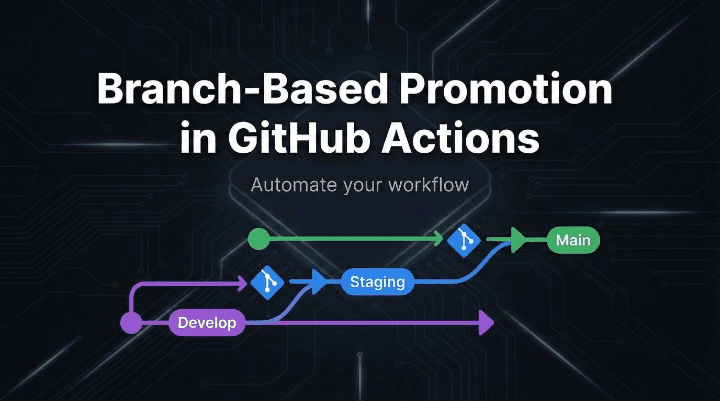
Branch-based promotion is a CI/CD approach where promotion happens by promoting branches. Instead of manually choosing “deploy to staging” or “deploy to prod”, you treat your branches as the promotion pipeline:
- Merge into
develop→ deploy to staging - Merge into
main→ deploy to production
GitHub Actions then becomes the automation layer that reacts to branch updates, while GitHub branch protection and GitHub Environments become the control plane for governance (reviews, approvals, restricted deployments, scoped secrets).
This article documents the complete model: architecture, repository setup, workflow design, security boundaries, and production-grade YAML patterns.
What Branch-Based Promotion Actually Means
Branch-based promotion ties together three things:
- Branching model (which branches represent which stage)
- Promotion gates (what must be true to merge into the next branch)
- Deployment triggers (what GitHub Actions does when a branch changes)
A standard mapping looks like this:
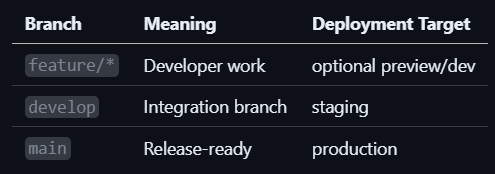
Promotion becomes a controlled merge path:
feature/*PR →develop(promote to staging)developPR →main(promote to production)
The key idea: the branch is the environment boundary.
Why Teams Use Branch-Based Promotion
Branch-based promotion tends to work well because it gives you:
- A single, auditable promotion flow (every promotion is a PR merge)
- Clear environment ownership (staging = develop, production = main)
- Less manual deployment clicking
- Repeatability (same workflow logic, different environment contexts)
But to do it safely, you must use the correct GitHub primitives.
The GitHub Building Blocks You Must Use
1) Branch Protection Rules (merge gate)
Branch protection enforces rules like:
- Require PRs (no direct pushes)
- Require approvals
- Require status checks (CI must pass)
- Optional: require linear history, restrict who can push
This is what controls who can promote code into develop and main.
2) GitHub Environments (deployment gate)
GitHub Environments are where you enforce deployment governance:
- Required reviewers (manual approval before production deploy runs)
- Branch restrictions (only
maincan deploy to production) - Environment-scoped secrets (prod secrets available only in prod jobs)
Important: if: conditions in YAML are helpful, but not a security boundary. Environments are the actual boundary.
3) Correct branch context in workflows
Depending on trigger type:
-
On
push: branch isgithub.ref_name -
On
pull_request:- source branch is
github.head_ref - target branch is
github.base_ref
- source branch is
This matters when you want different behavior for PR validation vs post-merge deployment.
Promotion Patterns (Choose One)
Pattern A: Branch per Environment (pure branch-based promotion)
- Deploy staging on push to
develop - Deploy production on push to
main
This is the simplest and most common.
Pattern B: Branch promotion + environment approvals
Same as Pattern A, but production requires manual approval via production environment reviewers.
This is the most practical “real world” setup.
Pattern C: Build once, promote the artifact (best practice)
- Build an immutable artifact once (container image tagged with commit SHA)
- Deploy the same artifact to staging and production
- Still branch-driven, but eliminates “rebuild drift”
This is the strongest approach if you care about reproducibility.
Repository Setup (Do This Once)
Step 1: Create environments
Go to: Repo → Settings → Environments
Create:
stagingproduction
Configure:
staging
- Allow deployments only from
develop - Add staging secrets (
STAGING_*)
production
- Allow deployments only from
main(and/or version tags) - Require reviewers (approval gate)
- Add production secrets (
PROD_*)
Step 2: Protect your promotion branches
Go to: Repo → Settings → Branches
Protect:
maindevelop(recommended)
Typical rules:
- Require PR
- Require at least 1–2 reviews
- Require status checks (CI workflow)
- Optionally restrict who can push
This ensures promotions can’t bypass review/CI.
Reference Pipeline: CI + Branch-Based Promotion Deploy
Below is a clean baseline you can copy.
1) ci.yml (PR validation + branch checks)
name: CI

on:
  pull_request:
    branches: [ develop, main ]
  push:
    branches: [ develop, main ]

permissions:
  contents: read

jobs:
  test:
    runs-on: ubuntu-latest
    steps:
      - uses: actions/checkout@v4

      - name: Set up runtime
        uses: actions/setup-node@v4
        with:
          node-version: "20"

      - name: Install
        run: npm ci

      - name: Unit tests
        run: npm test

      - name: Build
        run: npm run build
Attach this CI job as a required status check for develop and main.
2) deploy.yml (deploy on push to develop/main)
name: Deploy

on:
  push:
    branches: [ develop, main ]

permissions:
  contents: read
  id-token: write    # needed if using OIDC to cloud
  packages: read     # needed if pulling images from GHCR

concurrency:
  group: deploy-${{ github.ref_name }}
  cancel-in-progress: false

jobs:
  deploy-staging:
    if: github.ref_name == 'develop'
    runs-on: ubuntu-latest
    environment:
      name: staging
    steps:
      - uses: actions/checkout@v4

      - name: Deploy to staging
        run: |
          echo "Deploying ${GITHUB_SHA} to STAGING"
          # ./deploy.sh staging

  deploy-production:
    if: github.ref_name == 'main'
    runs-on: ubuntu-latest
    environment:
      name: production
    steps:
      - uses: actions/checkout@v4

      - name: Deploy to production
        run: |
          echo "Deploying ${GITHUB_SHA} to PRODUCTION"
          # ./deploy.sh production
How this stays safe:
- Branch protection prevents direct pushes and forces PR reviews
- Environment restrictions prevent non-
mainbranches deploying production - Production environment reviewers create the final human gate
Best Practice: Build Once, Promote the Artifact
If you rebuild separately on staging/prod, you risk “different bits in prod”.
A solid approach: build and push an image tagged with the commit SHA:
build-and-promote.yml (example with GHCR)
name: Build & Promote

on:
  push:
    branches: [ develop, main ]

permissions:
  contents: read
  packages: write
  id-token: write

jobs:
  build-image:
    runs-on: ubuntu-latest
    outputs:
      image: ${{ steps.meta.outputs.image }}
    steps:
      - uses: actions/checkout@v4

      - name: Compute image tag
        id: meta
        run: echo "image=ghcr.io/${{ github.repository }}/app:${{ github.sha }}" >> $GITHUB_OUTPUT

      - name: Build image
        run: docker build -t "${{ steps.meta.outputs.image }}" .

      - name: Login GHCR
        run: echo "${{ secrets.GITHUB_TOKEN }}" | docker login ghcr.io -u "${{ github.actor }}" --password-stdin

      - name: Push image
        run: docker push "${{ steps.meta.outputs.image }}"

  deploy-staging:
    if: github.ref_name == 'develop'
    needs: build-image
    runs-on: ubuntu-latest
    environment: staging
    steps:
      - name: Deploy staging
        run: |
          echo "Deploying ${{ needs.build-image.outputs.image }} to STAGING"
          # ./deploy.sh staging "${{ needs.build-image.outputs.image }}"

  deploy-production:
    if: github.ref_name == 'main'
    needs: build-image
    runs-on: ubuntu-latest
    environment: production
    steps:
      - name: Deploy production
        run: |
          echo "Deploying ${{ needs.build-image.outputs.image }} to PRODUCTION"
          # ./deploy.sh production "${{ needs.build-image.outputs.image }}"
This gives you:
- reproducible deployments
- clean audit trail: commit → image tag → environment deploy
Promotion Gates Checklist (What to Enforce)
Gate for feature/* → develop
- CI required
- 1 approval minimum
- optional: preview deploy and smoke tests
Gate for develop → main
- CI required
- 2 approvals recommended
- optional: security scan, changelog/version bump
Gate for production deployment (even after merge)
- production environment requires reviewers
- production environment restricts deployment branch to
main - production secrets are only in production environment
Security Notes (Don’t Get Burned)
1) Treat environments as the security boundary
YAML if: checks are easy to bypass if someone can modify workflows.
Environment protection is harder to bypass and is the right control.
2) Keep secrets environment-scoped
- Staging secrets in
staging - Production secrets in
production
3) Prefer OIDC over long-lived credentials
If you deploy to cloud, OIDC reduces secret leakage risk.
4) Be careful with pull_request_target
It runs with base-repo permissions and can expose secrets if you execute PR code.
Troubleshooting Common Issues
“Why is production deploy waiting?”
Your production environment likely requires manual approval. That’s expected.
“Why can’t this branch deploy to production?”
Your production environment probably restricts deployments to main only.
“Why does the branch name look different in PR workflows?”
Use:
github.head_reffor PR source branchgithub.base_reffor PR target branch
“Why do environment secrets appear empty?”
They only become available to jobs that reference the environment and pass environment rules.
A Minimal Production-Ready Setup
If you want the smallest setup that’s still serious:
developandmainprotected- CI required checks
stagingenvironment allows deploy only fromdevelopproductionenvironment allows deploy only frommainand requires approval- Deploy workflow triggers only on push to
developandmain
So the takeaway is .....
Branch-based promotion is clean because it turns deployment into a disciplined merge flow:
- Your PR process becomes your promotion mechanism
- Your protected branches become your promotion gates
- Your environments become your deployment security boundary
- Your workflows become simple and deterministic
If you want, paste your actual branch names (some teams use dev, staging, release/*, tags like v*) and your deployment target (VM, Kubernetes, ECS, Cloud Run, serverless). I’ll rewrite the YAML to match your exact promotion path and include the right secrets/approvals model.